
GolfCompat
Garmin R10: Software and Room Planning
Check Garmin R10 software support and room requirements before choosing a setup.
Placement and technology
- Name
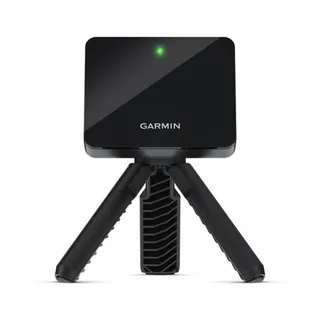
- Garmin R10
- Sensor placement
- Behind the ball
- Measurement technology
- radar
Software support
Publisher listings only. GolfCompat has not tested these pairings.
Table help
Scroll sideways to read all columns. Keyboard: focus the table area and use the arrow keys.
| Monitor / software | Support | Connection evidence | Listed by | Publication tier | Complete requirements |
|---|---|---|---|---|---|
Garmin R10 | Support documented | Publisher connection guide | Software publisher | Listing published by GSPro | Listing only; requirements not stated by GSPro |
Requirements and source notesConfirm unstated requirements with the manufacturer before buying. Compatibility as published by GSPro; read by GolfCompat on October 18, 2026. GolfCompat has not tested this pairing. Source cautions
| |||||
Garmin R10 | Support documented | Publisher connection guide | Monitor manufacturer | Listing published by Garmin | Listing only; requirements not stated by Garmin |
Requirements and source notesConfirm unstated requirements with the manufacturer before buying. Compatibility as published by Garmin; read by GolfCompat on October 18, 2026. GolfCompat has not tested this pairing. Source cautions
| |||||
Garmin R10 | Support documented | Publisher connection guide | Both parties | Listing published by ProTee United and Garmin | Listing only; requirements not stated by ProTee United and Garmin |
Garmin's SimLink FAQ says TGC2019 is currently being removed from storefronts and some features may no longer be available; confirm availability with ProTee United before buying a licence. Requirements and source notesConfirm unstated requirements with the manufacturer before buying. Compatibility as published by ProTee United and Garmin; read by GolfCompat on October 18, 2026. GolfCompat has not tested this pairing. Source cautions
| |||||
Room measurements
Table help
Scroll sideways to read all columns. Keyboard: focus the table area and use the arrow keys.
| Monitor | Dimension | Measurement endpoints | Published value | Meaning |
|---|---|---|---|---|
| Garmin R10 | Sensor to ball | sensor position to tee | 6 ft (1828.8 mm) to 8 ft (2438.4 mm) | Setup range |
| Garmin R10 | Ball flight | tee to net impact plane | 8 ft (2438.4 mm) | Minimum |
Garmin R10: the model-specific check
Check both the sensor-to-tee distance and the tee-to-net distance. The GSPro connection guide is separate evidence from Garmin’s indoor placement instructions.
Before buying
Confirm the host computer, required software plans, and exact hardware variant before ordering. A source link establishes the cited claim; it does not supply an installation assessment or guarantee that a seller’s bundle includes every required component.
FlightScope’s Mevo+ is another unit whose maker documents a behind-the-ball placement, so the distances to compare are the same two.
Related guides
launch monitor directory
Garmin R10 with GSPro
Garmin R10 with E6
ceiling height validator
Garmin R10 with GSPro bundle records
Garmin R10 with E6 bundle records
Garmin R10 setup order
Garmin R10 software support
garmin r10 not connecting
golf simulator room dimensions
Garmin R10 space requirements
SkyTrak vs Garmin R10
Garmin R50 vs R10
FlightScope Mevo+ vs Garmin R10
Garmin R10 vs Rapsodo MLM2PRO
Garmin R10 vs Square Golf
Garmin R10 vs Uneekor Eye XO
Garmin R10 vs Uneekor Eye XO2
R10 tripod, mat and ball checks
Use the documented tripod and alignment steps on the R10 setup page. Check the monitor height against the finished mat surface before adding a leveling stand. A third-party stand needs its own fit and adjustment check.
Check the exact ball technology and current monitor firmware with the manufacturer. RCT and RPT are different labels; a ball requirement for another monitor does not establish an R10 requirement. We have not qualified an Amazon ball or stand option for this page.
The component fit reference separates mat thickness, containment dimensions and screen space. Keep those measurements beside the R10 sensor and ball-flight distances.
Sources (7)
GSPro: GSPro Version 3
What launch monitor devices are supported?Read October 25, 2026
What launch monitor devices are supported? · Publication date not stated for this section
Garmin R10
What launch monitor devices are supported?Read October 18, 2026
What launch monitor devices are supported? · Publication date not stated for this section
Garmin R10
Garmin: Preparing for a Shot
Preparing for a ShotRead October 25, 2026
Preparing for a Shot · Publication date not stated for this section
behind the tee location
Preparing for a ShotRead October 25, 2026
Preparing for a Shot · Publication date not stated for this section
bottom edge of the launch monitor sits above the mat
Preparing for a ShotRead October 25, 2026
Preparing for a Shot · Publication date not stated for this section
red alignment line is aligned
Preparing for a ShotRead October 25, 2026
Preparing for a Shot · Publication date not stated for this section
Place the launch monitor on the ground
Preparing for a ShotRead October 25, 2026
Preparing for a Shot · Publication date not stated for this section
Attach the launch monitor to the tripod mount
Preparing for a ShotRead October 18, 2026
Preparing for a Shot · Publication date not stated for this section
between 6 ft. and 8 ft.
Preparing for a ShotRead October 18, 2026
Preparing for a Shot · Publication date not stated for this section
at least 8 ft. (2.4 m) away from the net
Garmin: Accuracy of Approach R10 Radar
Radar AccuracyRead October 25, 2026
Radar Accuracy · Publication date not stated for this section
uses radar to analyze several metrics
GSPro: Garmin Approach R10 Connection Guide
Start GSPro:Read October 18, 2026
Start GSPro: · Publication date not stated for this section
The GSPro Connect application will open with the Garmin R10 option showing
Garmin: How to Connect the Garmin Golf App to E6 Connect
How to Connect the Garmin Golf App to E6 ConnectRead October 18, 2026
How to Connect the Garmin Golf App to E6 Connect · Publication date not stated for this section
E6 Connect is a third-party service available for you to simulate rounds of golf with your Approach® R10 or Approach® R50 launch monitors.
Connecting to E6 Connect on PCRead October 18, 2026
Connecting to E6 Connect on PC · Publication date not stated for this section
The steps below will help you get started with connecting the Garmin Golf app to E6 Connect on your PC.
Approach R10 Requirements to Use E6 ConnectRead October 18, 2026
Approach R10 Requirements to Use E6 Connect · Publication date not stated for this section
Compatible Smartphone
ProTee United: TGC 2019 for Garmin R10 Setup Guide
1. Install TGC 2019 using the setup guideRead October 18, 2026
1. Install TGC 2019 using the setup guide · Article timestamp June 16, 2023
In order to use Garmin R10 for TGC 2019, the latest version of TGC 2019 has to be installed (version 4.3.2 or higher).
3. Downloading the Garmin App (SimLink)Read October 18, 2026
3. Downloading the Garmin App (SimLink) · Article timestamp June 16, 2023
To connect TGC 2019 with your Garmin, a mobile app is required. The mobile app transfers the data from Garmin to TGC and must stay open at all times.
Garmin: How to Connect the Approach R10 to The Golf Club 2019 SimLink App
How to Connect the Approach R10 to The Golf Club 2019 SimLink AppRead October 18, 2026
How to Connect the Approach R10 to The Golf Club 2019 SimLink App · Publication date not stated for this section
The Golf Club 2019 (TGC2019) SimLink App is a third-party service available for you to simulate rounds of golf with your Approach® R10 portable golf launch monitor.
RequirementsRead October 18, 2026
Requirements · Publication date not stated for this section
Compatible Smartphone
This document supports the cited model or software requirement. We have not performed hands-on equipment testing.
GolfCompat provides planning information. Confirm the instructions for your exact equipment and have your room, swing clearance, and installation assessed before use. A listed equipment requirement does not certify personal safety.